

.png?hsLang=en)
Warehouse operations are often where small inefficiencies quietly turn into big costs. Missed picks, inaccurate stock counts, slow dispatch times, and poor visibility all add friction that’s hard to see until customers start complaining or margins slip.
That’s exactly where the NetSuite warehouse management module comes into play. It’s designed to bring structure, accuracy, and real-time visibility to warehouse operations, without forcing teams to juggle disconnected systems or spreadsheets.
What Is the NetSuite Warehouse Management Module?
The NetSuite warehouse management module, commonly referred to as NetSuite WMS, is an advanced add-on that extends NetSuite’s core inventory capabilities. It’s built to support high-volume, fast-moving warehouse environments that need more than basic stock tracking.
Unlike standalone WMS tools, NetSuite WMS sits natively inside Oracle NetSuite, which means warehouse activity is directly connected to finance, purchasing, manufacturing, and order management. There’s no syncing delays, no duplicate data, and no guesswork around what’s actually happening on the warehouse floor.
Why Basic Inventory Management Often Isn’t Enough
NetSuite’s standard inventory features work well for simpler operations. But once order volumes increase, multiple locations come into play, or barcoding becomes essential, limitations start to show.
Most growing businesses reach a point where they need:
- Real-time task direction for warehouse staff
- Mobile scanning instead of paper-based processes
- Accurate bin-level inventory tracking
- Faster pick, pack, and ship workflows
This is where the NetSuite warehouse management functionality starts to make a real difference.
Core NetSuite Warehouse Management Functionality Explained
NetSuite WMS focuses on controlling warehouse processes at a much more granular level. Instead of just knowing what stock you have, it shows exactly where it is, who’s handling it, and what needs to happen next.
Before diving into individual features, it’s worth keeping one thing in mind. The real strength of NetSuite WMS isn’t any single tool. It’s how everything works together in one system.
Inventory and Bin Management
At the heart of NetSuite warehouse management functionality is bin-level control. Inventory isn’t just tied to a location. It’s tied to specific bins, zones, and shelves.
This allows you to:
- Track stock movement at a granular level
- Reduce misplaced inventory
- Support FIFO, LIFO, or FEFO picking rules
- Improve space utilisation inside the warehouse
Warehouse teams always know where items are stored, which cuts down on wasted time and unnecessary walking.
Mobile Scanning and Barcode Support
NetSuite WMS is designed for mobile-first warehouse operations. Using handheld scanners or mobile devices, staff can perform tasks without returning to a desktop.
Key mobile-supported activities include:
- Receiving goods
- Picking and packing orders
- Cycle counting
- Bin transfers
This dramatically reduces human error and speeds up day-to-day operations, especially in busy environments.
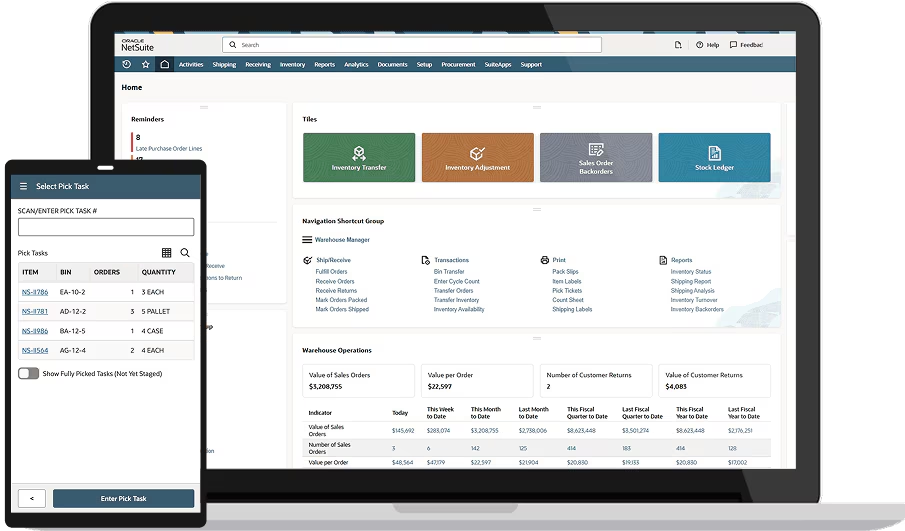
Picking, Packing, and Shipping Workflows
One of the biggest advantages of the NetSuite warehouse management module is how it streamlines order fulfilment. Instead of manual decision-making, tasks are system-directed.
NetSuite WMS supports multiple picking strategies, including:
- Single order picking
- Wave picking
- Batch picking
- Zone picking
Each approach suits different warehouse layouts and order profiles. The system assigns tasks based on priority, location, and availability, which helps teams work smarter instead of harder.
Packing and Shipping Integration
Once items are picked, NetSuite WMS guides users through packing and shipping. This includes cartonisation, packing validation, and label generation.
Because shipping is connected to NetSuite order management and financials, you get:
- Accurate shipping costs
- Fewer dispatch errors
- Faster invoicing
- Better customer communication
There’s no need to reconcile data between systems later.
Real-Time Visibility Across the Warehouse
One of the most underrated benefits of NetSuite warehouse management functionality is visibility. Managers can see what’s happening on the warehouse floor without walking the aisles.
Dashboards and reports show:
- Open picking tasks
- Orders waiting to ship
- Inventory discrepancies
- Staff productivity
This makes it much easier to spot bottlenecks early and adjust resources before problems escalate.

How NetSuite WMS Supports Growing and Complex Operations
As businesses scale, warehouse complexity usually scales with them. More SKUs, more locations, more customers, and tighter delivery expectations all add pressure.
The NetSuite warehouse management module is built to handle this growth without forcing a system change later. It supports:
- Multiple warehouses and locations
- High transaction volumes
- Integration with manufacturing and MRP
- Advanced reporting across sites
Because it’s part of the wider NetSuite ecosystem, expansion doesn’t mean starting from scratch.
NetSuite WMS vs Standard NetSuite Inventory
A common question is whether NetSuite WMS is really necessary. The short answer is that it depends on your operational complexity.
Here’s a simple way to think about it:
- Standard inventory management tells you what stock you have
- NetSuite WMS controls how that stock moves through your warehouse
If warehouse execution matters to your business, WMS is usually worth it.
Implementation Considerations and Common Pitfalls
Implementing the NetSuite warehouse management module isn’t just a technical exercise. It’s also an operational one.
Successful implementations usually involve:
- Reviewing warehouse layouts and bin structures
- Defining clear picking and packing workflows
- Training warehouse staff early
- Phasing functionality rather than switching everything on at once
Trying to replicate inefficient manual processes inside WMS rarely ends well. This is often a good opportunity to clean things up.
Who Is NetSuite Warehouse Management Best For?
NetSuite WMS isn’t for every business, and that’s okay. It’s best suited to organisations where warehouse performance directly impacts customer satisfaction and profitability.
Typical good-fit scenarios include:
- Distributors with high order volumes
- Manufacturers with finished goods warehouses
- E-commerce businesses with fast dispatch requirements
- Multi-location operations needing consistency
- Smaller teams with very low volumes may not need this level of control yet.
Common Add-Ons Used Alongside NetSuite Warehouse Management
While the NetSuite warehouse management module covers a lot out of the box, many businesses choose to extend it with specialist add-ons. These tools don’t replace NetSuite WMS. Instead, they sit alongside it to improve usability, speed, or specific operational workflows.
This is especially common in high-volume or fast-moving warehouses, where small efficiency gains add up quickly.
RF-SMART
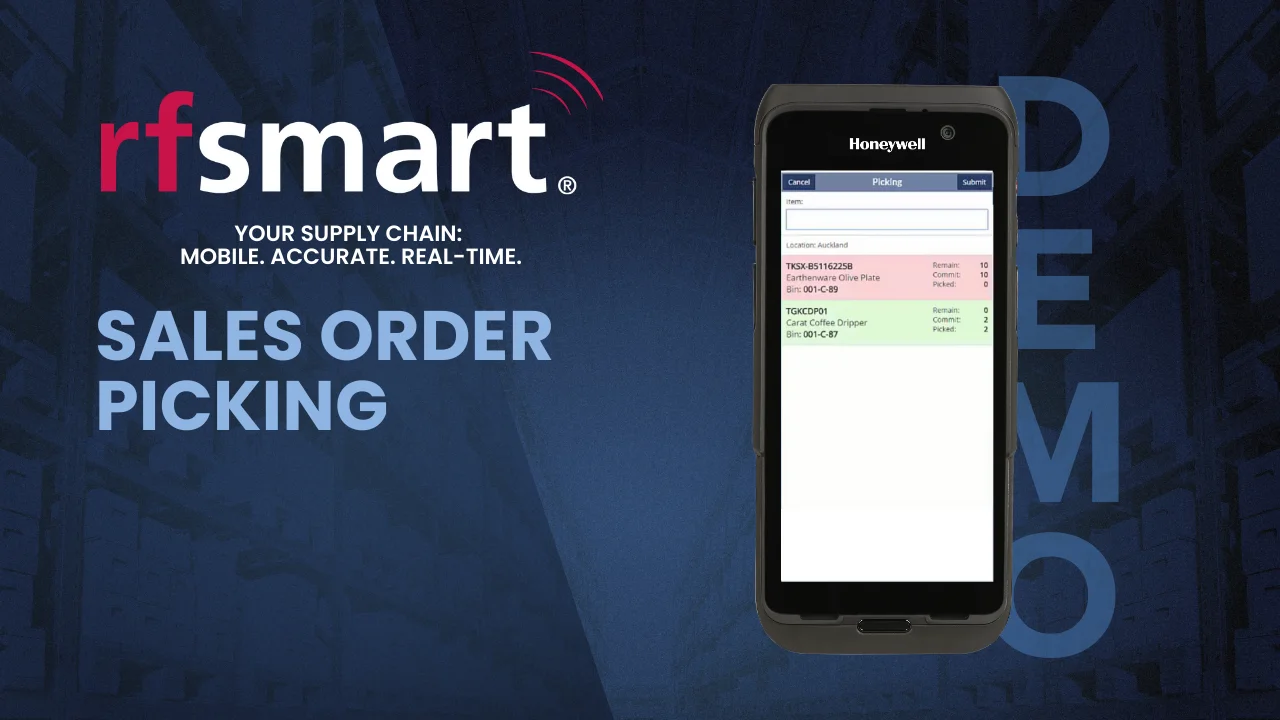
RF-SMART is one of the most widely used add-ons for NetSuite WMS. It focuses heavily on barcode-driven workflows and mobile warehouse execution.
RF-SMART is often chosen when warehouse teams need a more guided, scanner-first experience than NetSuite WMS alone provides.
It’s commonly used for:
- Advanced mobile scanning workflows
- Faster picking, packing, and receiving
- User-friendly handheld device interfaces
- Reduced training time for warehouse staff
For businesses with large warehouse teams or seasonal labour, RF-SMART can significantly reduce errors and onboarding time.
WAER (Warehouse Automation & Efficiency for Retail)
WAER is a more lightweight alternative that focuses on warehouse efficiency without adding unnecessary complexity.
WAER is often used by retail, wholesale, and e-commerce businesses that want tighter picking and packing controls but don’t need highly customised workflows.
Typical use cases include:
- Streamlined pick and pack processes
- Improved accuracy for high-order volumes
- Faster deployment compared to larger WMS extensions
- Cost-effective enhancements to NetSuite WMS
It’s a strong option for businesses that want better execution without a heavy operational overhaul.
Shipping and Rate Management Add-Ons
Although NetSuite WMS handles warehouse execution, many businesses pair it with shipping-specific tools to optimise carrier selection and label generation.
Popular examples include tools that integrate directly with NetSuite to:
- Compare real-time carrier rates
- Automate label creation
- Support multi-carrier shipping rules
- Improve last-mile visibility
These tools work particularly well when shipping volume is high and margins are sensitive to freight costs.
How to Decide Whether You Need an Add-On
Not every NetSuite WMS implementation needs additional tools. In many cases, native functionality is more than enough, especially early on.
Add-ons usually make sense when:
- Warehouse teams rely heavily on mobile devices
- Picking errors are a recurring issue
- Order volumes are growing faster than headcount
- Training new staff is slow or inconsistent
The key is to implement WMS first, then layer on add-ons where there’s a clear operational return. Buying everything upfront often creates more complexity than value.
How Much Does The NetSuite Warehouse Management Module Cost?
NetSuite modules tend to cost anywhere from $599 per month to $1699 per month. Your warehouse management cost will be very tailored to your business, as it depends not just on the license cost, but on how complex your implementation will be. For example, you may have third-party add-ons and non-standard processes that require extra set up cost. Get in touch with us to receive a free license estimate for your business, or use our NetSuite pricing calculator below to get an instant quote!

The NetSuite warehouse management module gives you the control and visibility needed to run a faster, more accurate warehouse without disconnected systems or manual workarounds. Add-ons can be layered in later if and when they make sense, but many businesses get very strong results using NetSuite WMS on its own. Threadgold Consulting can help you with your NetSuite implementation journey, so contact us now and schedule your free intro call.